

Health app permissions are explicit user consents that control which types of health data an app can read from or write to your device's health system. Understanding how health app permissions work is the first step toward protecting your most sensitive personal information. Modern platforms like Apple HealthKit and Google Health Connect enforce these consents at the individual data-type level, meaning a fitness tracker cannot quietly access your heart rate data just because you gave it access to your step count. The permission system is designed to put you in control, but only if you know how to use it.
How health app permissions work at the data-type level
Health app permissions operate on a granular matrix. Each data type requires its own separate authorization, and read access and write access are controlled independently for every category. A sleep-tracking app might request write access to sleep data and read access to heart rate, but those are two distinct permission decisions you make separately.
This structure matters because it prevents apps from bundling unrelated data requests into a single "accept all" prompt. When a fitness app asks for permission, your device's operating system presents a specific list of data types. You approve or deny each one. The result is a permission matrix where an app might have write access to workout data but no read access to blood glucose records.

The system also enforces a privacy-protecting design that surprises most people. HealthKit returns empty results when read permission is denied, rather than an explicit rejection message. This means an app cannot tell whether you denied access or simply have no data of that type recorded. The design prevents apps from inferring sensitive health facts based on whether a denial was returned.
Apps are also sandboxed from each other's permissions. Apps cannot see permissions granted to other apps, and they cannot access data types they did not request during the app store review process. This containment prevents one app from piggybacking on another app's broader access.
Pro Tip: When an app requests access to a data type you do not use, deny it. Granting unused permissions creates unnecessary exposure with zero functional benefit.
Here is what a typical permission request covers:
- Heart rate: Read and write controlled separately
- Steps and activity: Often requested as read-only by third-party apps
- Sleep analysis: Write access for tracking apps, read access for analytics apps
- Blood glucose: Typically requires explicit justification from the developer
- Location: Separate from health data but often bundled in fitness app requests
How to manage app permissions using system dashboards
Both major mobile platforms provide a central location where you can review and revoke every health permission you have ever granted. You do not need to uninstall an app to cut off its data access.
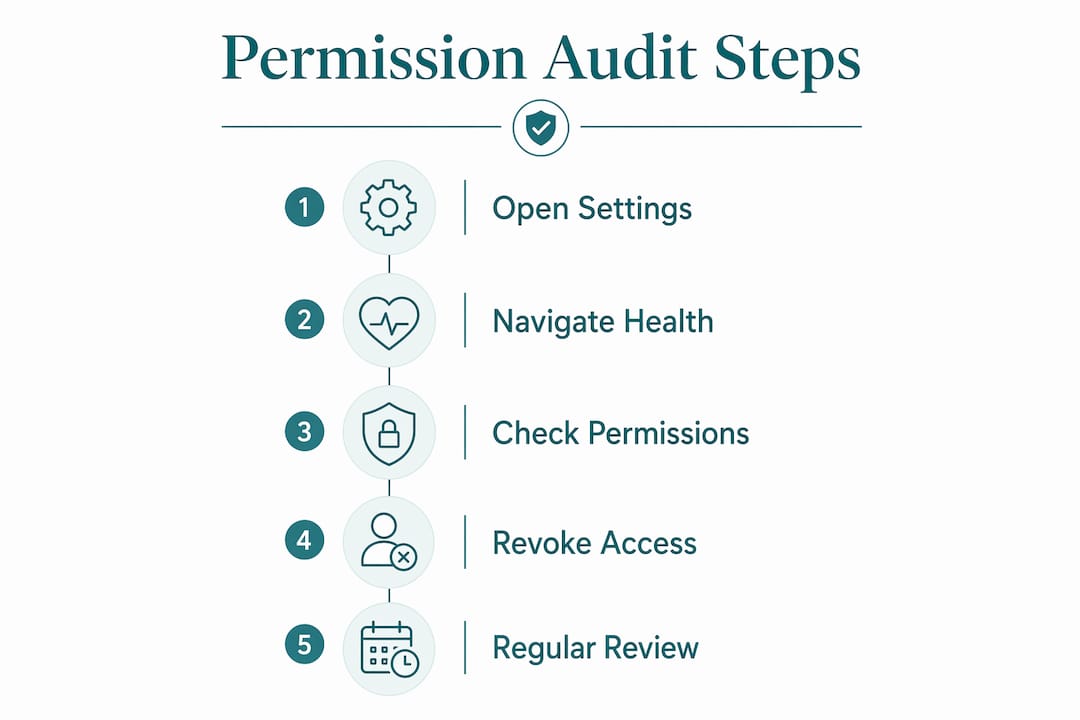
On iPhone, the path is Settings, then Health, then Data Access and Devices. On Android, the Health Connect app serves the same function. Both dashboards list every app with active permissions and show exactly which data types each app can read or write. Users can revoke permissions anytime without affecting the app's installation or other functions.
Revoking a permission does not delete data the app already collected on its own servers. It only stops future access through the platform's health system. This distinction is critical and covered in more detail in the next section.
A regular permission audit takes less than five minutes and catches two common problems: apps you forgot about that still have active access, and apps that accumulated more permissions than they actually need. The need-to-know principle applies directly here. Any app with access to data it does not use for its core function is over-permissioned.
Pro Tip: Set a calendar reminder every three months to open your health permissions dashboard. Delete or revoke access for any app you have not opened in 60 days.
A structured audit follows these steps:
- Open your health permissions dashboard (Settings > Health on iOS, Health Connect on Android).
- Review every app listed and identify what data types it can read and write.
- Ask whether each data type is genuinely required for the app's function.
- Revoke any permission that does not have a clear, obvious purpose.
- Check for apps you no longer use and revoke all their permissions immediately.
What are the real privacy risks of health app permissions?
Granting a permission through your phone's system dialog is not the end of the privacy story. Once an app accesses your health data, it may store that data on its own servers, where your operating system's protections no longer apply. From that point, the app's privacy policy governs how your data is used, shared, or sold.
This is the gap most people miss. The permission dialog feels like the final gate. It is not. An app with legitimate read access to your heart rate data can transmit that data to its own cloud infrastructure and use it for purposes entirely separate from the app's stated function.
> Granting permissions does not guarantee data is safely handled. App privacy policies dictate data usage after access is granted, and those policies can change without prominent notice to users.
Location permissions carry a specific risk worth calling out. "Always" location access enables continuous tracking of your movements, which can be combined with health data to build detailed behavioral profiles. Almost no health app requires "Always" location access to function. "While Using" is sufficient for GPS-based workout tracking. Any app requesting "Always" location access deserves direct scrutiny before you approve it.
The principle of least privilege is the governing rule for health app data access. Grant only what the app demonstrably needs. Specific red flags to watch for include:
- A meditation app requesting access to blood glucose records
- A step counter requesting microphone or contacts access
- Any app requesting "Always" location when GPS is not part of its core feature set
- Apps with vague or missing privacy policies requesting sensitive health data
Reading an app's privacy policy before granting permissions is not paranoia. It is the only way to know whether your data stays on your device or travels to third-party advertising networks. The PIPEDA health information rules that govern Canadian apps set baseline standards, but enforcement depends on you knowing your rights.
How do Apple HealthKit and Google Health Connect differ?
Both HealthKit and Health Connect use per-data-type permission models, but their technical implementations create meaningfully different experiences for people managing their health app privacy settings.
| Feature | Apple HealthKit | Google Health Connect |
|---|---|---|
| Read permission visibility | Opaque: apps cannot detect denial | Transparent: apps can check permission status directly |
| Write permission model | Explicit per data type | Explicit per data type |
| Background data access | Handled through standard permission grants | Requires separate background read permission tier |
| Historical data access | Included in standard read permission | Requires additional historical data permission |
| App-to-app visibility | Apps cannot see other apps' permissions | Apps cannot see other apps' permissions |
The most consequential difference is how each platform handles denied read permissions. HealthKit's opaque model means an app receives empty data when denied, with no way to distinguish denial from an empty record. Health Connect allows apps to query permission status directly, which gives developers more information but also means the app knows you denied access.
Health Connect requires multiple permission tiers for background and historical data, adding complexity that HealthKit handles more quietly. For people who want to understand exactly what an app can see, Health Connect's transparency is an advantage. For people who prefer that apps not know their permission choices, HealthKit's opaque model offers stronger privacy by design.
Apple HealthKit also has an asymmetric rule worth knowing. An app that has write permission for a data type gains implicit read access to the data it wrote, but not to data written by other apps or devices. This prevents bulk data harvesting while still letting apps read back their own contributions.
Key Takeaways
Health app permissions function as a granular consent system where each data type and each direction of access requires separate user approval, and managing these permissions actively is the most effective way to protect your health data.
| Point | Details |
|---|---|
| Granular consent by data type | Each health data category requires separate read and write permission approvals. |
| Central dashboard control | iOS and Android both provide dashboards to review and revoke permissions without uninstalling apps. |
| OS permissions are not the final gate | Apps may store health data on their own servers, governed by their privacy policies, not your phone's settings. |
| Least privilege principle | Only grant permissions that directly support an app's stated function; deny everything else. |
| Platform differences matter | HealthKit uses an opaque read model; Health Connect allows apps to check permission status directly. |
My honest take on health app permissions
I have spent years watching people click "Allow" on every permission dialog without reading a single word. The permission system is genuinely well-designed. The problem is that most people treat it like a speed bump rather than a decision point.
The audit habit is the single most underused tool available to anyone concerned about health data privacy. Most people grant permissions once and never revisit them. Apps accumulate access over months and years, including apps that were deleted from the home screen but never had their permissions revoked. Deleting an app icon does not revoke its health permissions on all platforms. You have to do that manually.
The "Always" location permission is the one I feel most strongly about. No calorie counter or heart rate monitor needs to know where you are at 2:00 AM. When an app requests that level of access, the correct response is to deny it and ask why it needs it. If the answer is not obvious from the app's core function, the answer is no.
Reading privacy policies feels tedious, but a five-minute scan for the words "third party," "advertising," and "sell" tells you most of what you need to know. If those words appear without clear limitations, your health data is likely being used beyond what you intended when you tapped "Allow."
The permission system gives you real control. Use it deliberately.
> — Rishi
Healthnavigatorai: health guidance that respects your privacy
Healthnavigatorai's MediGuide is built for Canadians who want health guidance without trading their personal data for it. MediGuide requires no sign-up, stores no personal information, and never sells your data. You describe your symptoms or upload a medical document and receive a clear, plain-English assessment with guidance on next steps and average wait times in your region. There are no permission dialogs asking for your location history or contact list. The tool does one thing: helps you understand your health situation privately and quickly. If you want to check your symptoms without worrying about what an app does with your data afterward, MediGuide is the right starting point.
FAQ
What does a health app permission actually control?
A health app permission controls whether an app can read data from or write data to your device's health system for a specific data type, such as heart rate or sleep records. Read and write access are granted separately for each category.
Can an app see that I denied its permission request?
On Apple HealthKit, apps cannot detect a denial. The system returns empty data, which looks identical to having no recorded data. On Google Health Connect, apps can check permission status directly.
Does revoking a permission delete my health data?
Revoking a permission stops future access through your phone's health system but does not delete data the app already copied to its own servers. Contact the app developer or check its privacy policy to request data deletion.
How often should I audit my health app permissions?
A quarterly audit is sufficient for most people. Open your health permissions dashboard every three months, review active permissions, and revoke access for any app you no longer use or that holds permissions beyond its core function.
Why do some health apps request location access?
GPS-based fitness apps use location to track routes during outdoor workouts. "While Using" location access covers this need entirely. Any health app requesting "Always" location access warrants skepticism, as continuous location tracking enables behavioral profiling unrelated to health monitoring.


